

Samsung Washer Repair in Catonsville, MD
Power fluctuations from seasonal weather patterns in the Catonsville area put extra stress on washer electronics and motor components, making Samsung Washer Repair a common need for local homeowners. Catonsville Appliance Repair Pros connects you with independent local repair providers who service Samsung washers and can typically reach your home in Bloomsbury, College Hills, or nearby areas quickly when a malfunction occurs. You get a straightforward path to same-day or next-day repair options without having to search multiple technicians yourself.
Samsung Washer Repair for Catonsville Homeowners
Catonsville's climate brings seasonal weather shifts that put real stress on household appliances—particularly the electrical components and motors in Samsung washers. Power fluctuations from thunderstorms and winter weather patterns are common across the region, and these surges can damage the control boards, fill valves, and drive motors that keep your washer running smoothly. When a Samsung washer breaks down, you need a repair solution that understands both the appliance itself and the local conditions that may have contributed to the failure.
Catonsville Appliance Repair Pros connects property owners in the area—from College Hills to Edmondson Ridge and throughout Catonsville—with local independent repair providers who specialize in Samsung Washer Repair. Rather than navigating a national call center or waiting for an out-of-area technician, you work with someone familiar with your neighborhood who can reach you quickly and diagnose the issue on the spot. The independent providers in this network focus on getting to the root of your Samsung washer problem, whether it's an electrical fault, mechanical wear, or something else entirely, and they follow through until the repair holds. When your washer stops working, a straightforward local connection is your fastest path back to clean laundry.
Common Samsung Washer Error Codes
Not every code means a repair bill. Seven of these twelve Samsung washer codes are usually something you can clear yourself; the remaining five involve a part inside the unit.
Samsung Washer 4C
Often clearable without a technician
What it means: The washer asked for water and did not get what it expected, so it has stopped rather than run a cycle dry. Samsung shows this as 4C on newer panels, 4E on older ones and nF on some models — one fault, three displays.
Why it happens: Almost always something before the machine rather than inside it: a supply tap not fully open, a kinked fill hose behind the unit, or the small mesh screens where the hoses meet the washer silted up with scale and grit.
What you can check: Check both taps are fully open, then pull the machine out far enough to see the fill hoses are not kinked. If that looks fine, turn the taps off, unscrew the hoses at the machine end and look at the inlet screens for debris.
When to call someone: If the supply is good and the screens are clear, the inlet valve on the machine is next, and that is where it stops being an owner check.
Samsung Washer Ub
Often clearable without a technician
What it means: The load has gone off balance in the tub and the washer will not spin it at speed, because an unbalanced drum at spin speed can damage the machine.
Why it happens: Usually one heavy item on its own — a towel, a bath mat, a single pair of jeans — or a load that has twisted into a rope on one side of the drum.
What you can check: Open the door, redistribute the load by hand and restart the spin. Adding a couple of similar-weight items often settles it; washing one heavy item alone rarely spins well.
When to call someone: If it trips on every load including well-balanced ones, the suspension or the sensor reading the drum may need looking at.
Samsung Washer 4E
Often clearable without a technician
What it means: The same not-filling fault as 4C, shown as 4E on older Samsung panels.
Why it happens: A closed or partly closed tap, a kinked fill hose, or blocked inlet screens where the hoses connect.
What you can check: Work from the wall in: taps fully open, hoses unkinked, then the inlet screens at the machine end.
When to call someone: If water reaches the machine freely and it still will not fill, the inlet valve needs testing.
Samsung Washer SE
Often clearable without a technician
What it means: Water is not leaving the machine at the rate the cycle expects, or is not leaving at all. Shown as 5E, SE, 5C or nd depending on the panel.
Why it happens: The debris filter at the bottom front catches coins, hair grips and lint and eventually packs solid. A kinked drain hose or a standpipe that cannot take the flow does the same thing from further down the line.
What you can check: Open the small flap at the bottom front, drain the residual water into a tray and clean the filter. Then check the drain hose behind the machine for kinks and that it is not pushed too far into the standpipe.
When to call someone: If the filter is clean and the hose run is clear, the drain pump itself needs testing.
Samsung Washer UE
Often clearable without a technician
What it means: The same unbalanced-load condition as Ub, shown as UE on some Samsung models.
Why it happens: A single heavy item, or a load that has bunched to one side of the drum.
What you can check: Redistribute the load by hand and restart the spin.
When to call someone: If balanced loads also trip it, the drum suspension is worth checking.
Samsung Washer dC
Often clearable without a technician
What it means: The washer cannot confirm the door is shut and locked, so it will not start or will stop mid-cycle.
Why it happens: Most often laundry caught in the door seal stopping it closing flush, or a door that has been slammed rather than pushed shut.
What you can check: Open the door fully, clear anything caught around the seal, and close it firmly without forcing it. Check the latch and the strike plate for anything obstructing them.
When to call someone: If nothing is obstructing it and the lock still will not engage, the door lock assembly is the usual cause.
Samsung Washer SUd
Often clearable without a technician
What it means: The washer has detected far more foam than the drum is designed to handle, and is pausing to clear it before continuing.
Why it happens: Usually too much detergent, or a standard detergent used in a high-efficiency machine, which foams several times more than an HE formula.
What you can check: Let the machine run its own suds-clearing routine rather than cutting the cycle short. Next load, reduce the dose and check the detergent is HE-rated if your machine needs one.
When to call someone: If it appears with a correct HE dose, something may be holding water in the drum and it is worth having checked.
Samsung Washer 5C
Often clearable without a technician
What it means: The same not-draining fault as 5E and SE, shown as 5C on some Samsung panels.
Why it happens: A packed debris filter at the bottom front, a kinked drain hose, or a standpipe that cannot take the flow.
What you can check: Clean the filter behind the flap at the bottom front, draining the residual water into a tray first, then check the hose run behind the machine.
When to call someone: If the filter is clean and the hose is clear, the drain pump needs testing.
Samsung Washer nF
Often clearable without a technician
What it means: The washer is not filling — the same fault Samsung shows as 4C and 4E on other panels.
Why it happens: A tap that is not fully open, a kinked fill hose, or the inlet screens where the hoses meet the machine blocked with scale and grit.
What you can check: Check both taps, straighten the hoses, then turn the taps off and inspect the inlet screens at the machine end.
When to call someone: If water reaches the machine freely and it still will not fill, the inlet valve is next.
Samsung Washer OE
Usually needs a technician
What it means: There is more water in the tub than there should be, so the washer has stopped filling and is trying to pump out.
Why it happens: Normally the inlet valve passing water when it has been told to close, rather than anything to do with the load or detergent.
What you can check: Turn the supply taps off at the wall so no more water can arrive. There is no owner-side fix for a valve that will not shut.
When to call someone: Promptly — a valve stuck open is a flood risk as well as an error code.
Samsung Washer 0E
Usually needs a technician
What it means: The same overfill condition as OE, shown with a zero on some panels.
Why it happens: An inlet valve letting water through when it should be closed.
What you can check: Shut the taps at the wall to stop the fill. Nothing else here is an owner check.
When to call someone: Promptly, for the same reason as OE.
Samsung Washer ddC
Often clearable without a technician
What it means: The AddWash door — the small hatch in the main door — is not registering as closed and latched.
Why it happens: It is easy to push shut without seating the catch, and a trapped sock or glove will stop it closing flush.
What you can check: Open the AddWash door fully, clear anything caught in it, and press it closed until the catch engages.
When to call someone: If it is properly shut and still reads open, the hatch switch needs checking.
Samsung Washer HE
Usually needs a technician
What it means: A fault in the heater circuit, so the machine cannot bring the wash water up to the temperature the cycle asked for.
Why it happens: A component failure rather than anything that builds up, so it usually appears without warning.
What you can check: Nothing here is an owner check — the heater and its circuit are inside the machine.
When to call someone: When you see it. Cold-water cycles may still run, but the machine is not doing what the programme selected.
Samsung Washer 5E
Often clearable without a technician
What it means: The same not-draining fault Samsung shows as SE and 5C on other panels.
Why it happens: A packed debris filter at the bottom front, a kinked drain hose, or a standpipe that cannot take the flow.
What you can check: Open the flap at the bottom front, drain the residual water into a tray and clean the filter, then check the hose run.
When to call someone: If the filter and hose are clear and it still will not drain, the drain pump needs testing.
Samsung Washer LE
Usually needs a technician
What it means: Moisture has been found somewhere inside the machine it should not be — a leak, not a setting.
Why it happens: Water escaping from a hose connection, a seal or the tub reaches a sensor that shuts the cycle down.
What you can check: Turn the supply taps off at the wall and stop using the machine. The code says water is escaping but not from where.
When to call someone: This needs a technician — tracing the source means getting behind or under the machine.
Samsung Washer 3E
Usually needs a technician
What it means: A motor fault — the drive is not behaving the way the control expects.
Why it happens: A failure in the motor or its control circuit rather than anything to do with the load or detergent.
What you can check: Nothing here is an owner check. A single power-cycle at the breaker clears a one-off glitch; a code that returns is real.
When to call someone: If it comes back after a power cycle, the motor circuit needs testing.
| Code | What it means |
|---|---|
| Ub / UE / U6 | The load is unbalanced inside the tub, so the washer cannot spin it safely. |
| 5E / SE / 5C / nd | Water is not draining at the rate it should, or is not draining at all. |
| dC / dC1 / dL | The door is not being detected as closed and locked, so the cycle will not run. |
| SUd / Sd | An over-sudsing condition has been detected and the machine is pausing to let the foam clear. |
| OE / 0E / OC | There is too much water in the washer, which normally means the inlet valve is passing water when it should be shut. |
| LE / 1C | Moisture has been detected somewhere inside the machine that it should not be, which is a leak rather than a setting. |
| HE / HC | A fault in the heater circuit, so the machine cannot bring the water up to temperature. |
| 3E / 3C | A motor fault — the drive is not behaving as the control expects. |
| tE / tC | The temperature sensor is reporting a reading outside the range the cycle allows. |
| bE2 / 6E2 | A button on the control panel is reading as stuck or continuously pressed. |
Don't see your code? Call (410) 267-4455 — we'll help you track it down.
Common Samsung Washer Problems We Fix
Won't Drain Water
Clogged drain hoses, pump failures, or blockages in the filter trap prevent water from leaving the drum. The independent local provider Catonsville Appliance Repair Pros connects you with will diagnose the obstruction and restore proper drainage.
Not Spinning or Agitating
Belt wear, motor issues, or lid-switch problems stop the drum from turning during the wash cycle. A local provider in the Catonsville area can identify the cause and repair or replace the faulty component.
Leaking Water
Worn door seals, damaged inlet hoses, or internal seal failures allow water to escape during operation. The independent providers Catonsville Appliance Repair Pros connects you with can locate the leak source and perform the repair.
Error Code on Display
Samsung washers display error codes like 4C when sensors detect drainage problems, temperature issues, or mechanical faults. A local repair provider can read the code, diagnose the underlying problem, and restore normal function.
Won't Start Cycle
Power supply faults, control board failures, or door-latch issues prevent the washer from beginning a wash. The independent provider you're connected with will test components and restore power to your machine.
Loud or Vibrating Heavily
Foreign objects in the drum, worn drum bearings, or unbalanced loads cause excessive noise and movement. A local Samsung washer repair provider can identify the source and repair or replace worn parts to eliminate vibration.
Why Catonsville Homeowners Choose Samsung Washer Repair Pros
Samsung Washer Repair Experience
Independent local providers in the network specialize in Samsung washer repair, understanding the mechanics and electronics specific to Samsung models. Fast diagnosis and targeted solutions keep your laundry routine moving.
Samsung Washer Repair When You Need It
Responsive scheduling for Samsung washer repair means shorter wait times between breakdown and service call. Local availability in Catonsville and nearby areas reduces travel delays, getting your washer running sooner.
Clear Samsung Washer Repair Communication
Independent providers explain Samsung washer repair findings in plain language—what failed, why it failed, and what fixing it costs. Transparent communication lets you make confident decisions about your appliance.
Samsung Washers & Electrical Stress
Catonsville's exposure to power fluctuations from seasonal weather events can damage Samsung washer electronics and motor controls. Regular Samsung washer repair through local providers helps catch stress-related wear before it becomes urgent.
How Our Repair Service Works
Schedule Your Samsung Washer Repair Visit
Contact Catonsville Appliance Repair Pros and describe your Samsung washer problem—whether it's a drainage issue, drum malfunction, or control panel failure. We'll connect you with a local independent provider who can arrange a time that works for your schedule.
Technician Diagnoses Your Samsung Washer
The independent technician arrives to examine your Samsung washer, test its cycles, and identify the root cause. Power fluctuations from seasonal thunderstorms and winter weather in the Catonsville area can stress washer electronics; the technician will check for electrical damage and worn components.
Samsung Washer Repair & Follow-Up
Once the problem is confirmed, the independent provider performs the necessary repair—whether replacing a valve, motor, or control board specific to your Samsung model. They'll test the washer before leaving and answer any questions about ongoing care.
Need appliance repair in Catonsville? Our technicians can help fast.
Call (410) 267-4455Samsung Washer Repair Serving Catonsville and Nearby Communities
Catonsville's water supply from Baltimore City's reservoir system is moderately soft, but seasonal shifts can affect mineral content and water quality throughout the year. More significantly, the region's exposure to severe thunderstorms and winter ice storms creates frequent electrical stress on home appliances. Power surges and voltage fluctuations from severe weather are a common trigger for Samsung washer control boards, motor issues, and sensor failures—problems that property owners across Catonsville, including neighborhoods like Bloomsbury and Edmondson Ridge, encounter with regularity.
When electrical stress damages a Samsung washer's electronics or motor, quick access to a local repair provider becomes essential to prevent water damage and restore laundry function. Catonsville Appliance Repair Pros connects property owners with independent local technicians who service Samsung washers and understand how regional weather patterns and seasonal variations affect appliance longevity. Fast local response means shorter downtime and a better chance of resolving weather-related damage before secondary problems develop.
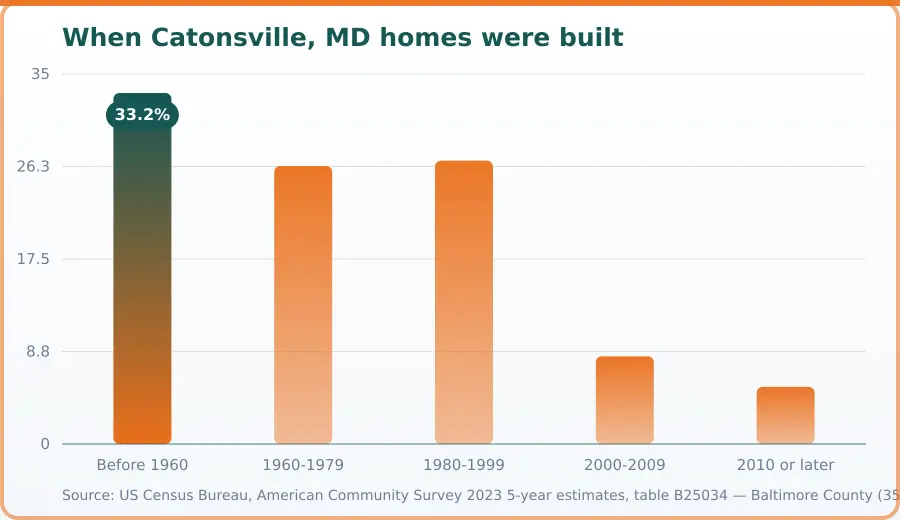
| Period | When homes were built (%) |
|---|---|
| Before 1960 | 33.2 |
| 1960-1979 | 26.3 |
| 1980-1999 | 26.8 |
| 2000-2009 | 8.3 |
| 2010 or later | 5.4 |
Source: US Census Bureau, American Community Survey 2023 5-year estimates, table B25034 — Baltimore County (350,296 housing units; county figure, as this location is not a separate Census place). Retrieved November 10, 2026.
Samsung Washer Repair FAQ — Catonsville, MD
Samsung Washer Repair addresses mechanical, electrical, and component issues that prevent your washer from operating correctly. Common repairs include drum seal replacement, motor problems, door lock failures, control board issues, and water valve malfunctions. A local technician will diagnose the problem, explain findings, and discuss repair options with you before proceeding with work on your specific model.
Catonsville Appliance Repair Pros connects you with independent local providers who typically respond to repair requests promptly. Many are able to schedule appointments within a few days. Because technicians serve the Catonsville area directly, travel time is minimal, making it easier to fit repairs into your schedule quickly when your Samsung washer breaks down.
Samsung Washer Repair pricing depends on which part failed, the complexity of the repair, and your washer's age and model. Labor costs and parts availability also play a role. The independent provider you're connected with will give you an estimate before work begins so you know what to expect. Contact a local provider directly for a quote specific to your repair need.
Before the technician arrives, clear the area around your Samsung washer so they have easy access. If your washer is currently full, remove damp clothing beforehand. Have your model number ready—it's usually found inside the door or on the back panel. Let the technician know about any unusual sounds, leaks, or error codes you've noticed to help speed up diagnosis.
Regular maintenance extends your Samsung washer's lifespan. Clean the rubber door gasket monthly to prevent mold and mildew buildup. Don't overload the drum, use the correct detergent amount, and leave the door open between cycles to allow drying. Running a cleaning cycle periodically helps maintain internal components. These simple habits reduce the likelihood of costly repairs later.
Yes. The region's frequent electrical storms and winter weather patterns can stress washer electronics and motors through power surges and fluctuations. These sudden electrical events sometimes trigger control board failures or motor problems. If you experience power disruptions during thunderstorms or cold snaps, monitor your Samsung washer for performance changes. A surge protector can help safeguard against future electrical damage.
More Repairs for This Brand
Homeowner Safety Toolkit
Before You Hire in Catonsville, MD, Check This
Before you hire anyone, use these independent national resources to confirm credentials, standards, and track record.
BBB
Look up any appliance repair company's complaint history, customer reviews, and accreditation status — a free, independent check before you hire.
Check StandingNFPA
A poorly repaired dryer, range, or water heater is a real fire risk. The National Fire Protection Association's home safety guidance covers what to check after any appliance service.
Appliance Fire Safety TipsCPSC
Check whether your specific appliance has an open safety recall before paying for a repair — some recalls cover the fix or a replacement for free.
Check for RecallsBook your Catonsville appliance repair today.
Call (410) 267-4455Where We Cover Near Catonsville, Maryland
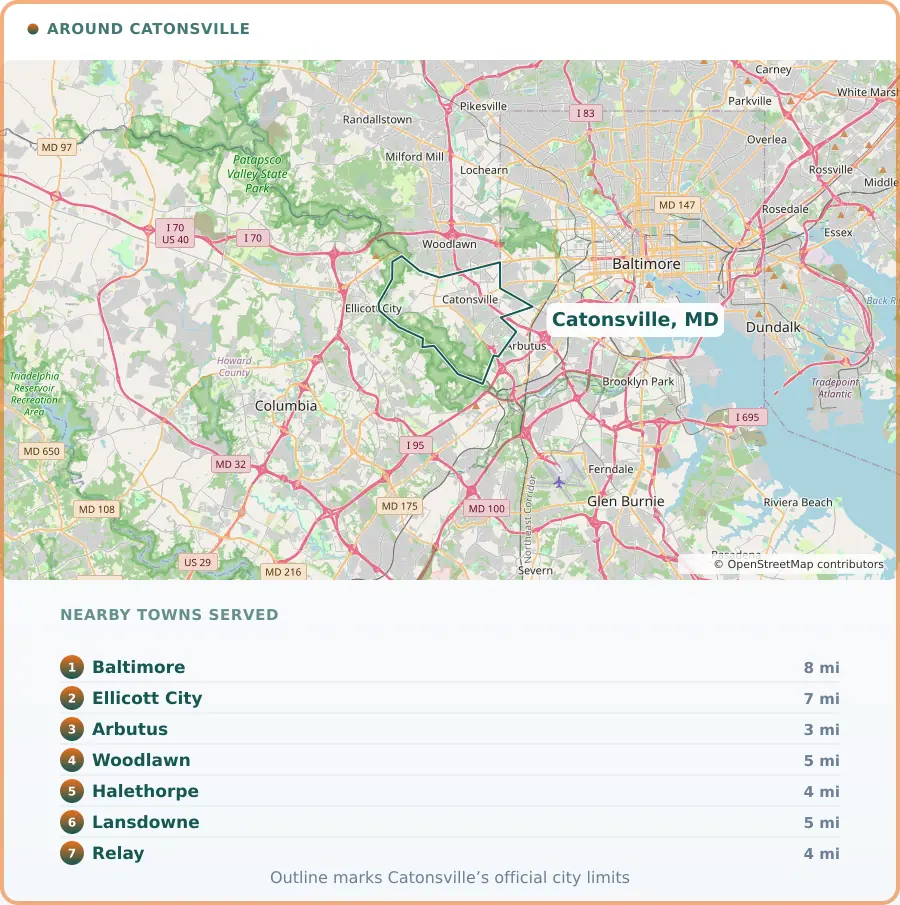
Coverage centres on Catonsville, MD and reaches 7 surrounding communities. Response time is what matters most in the hours after a problem is found, so knowing the ground is part of the job.
Catonsville, MD Information
Tucked just west of Baltimore, Catonsville, MD carries the easy rhythm of a community that's grown up around learning and care. With roughly 42,000 residents, it's anchored by UMBC and CCBC Catonsville, whose campuses help drive steady work in education and healthcare alongside employers like Spring Grove Hospital Center and St. Agnes Hospital. Government offices, professional services, and a loyal retail scene round out the picture, giving the town a stable, varied economic footing rather than relying on any single industry.
Walk along Frederick Road and you'll find longstanding small businesses mixing with newer shops, while neighborhoods like Oella and College Hills reflect the area's blend of historic charm and comfortable suburban living. It's a place built on quiet consistency — close enough to the city to feel connected, settled enough to feel like home.
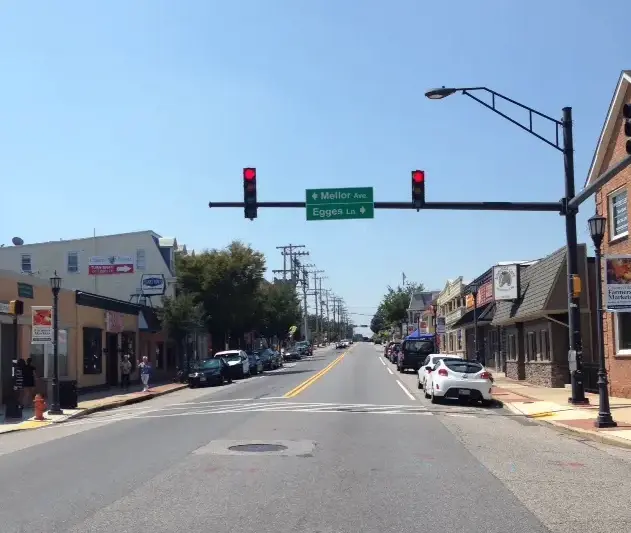
Photo: Scott218, CC BY-SA 4.0